Core Intelligence

Novologs Ai Agent
The Intelligence That Connects the Entire Business

The most significant and distinguishing feature of Novologs is its deeply integrated AI Agent.

The AI Agent is the central intelligence layer of Novologs and represents one of the platform's most important differentiators. Unlike a standalone AI assistant that only receives information when a user manually provides it, the Novologs AI Agent is designed to work within the organization's connected business environment and, subject to user permissions and access controls, understand information across the different modules of the platform. Because Novologs contains information relating to projects, tasks, customers, leads, vendors, contracts, documents, files, communications, team activities, timesheets, and financial operations, the AI Agent can work with a much broader business context. This enables users to ask questions in natural language and receive guidance based on information already available within the organization. For example, a user can ask about the current status of a project, outstanding tasks assigned to a particular employee, the history of a customer, pending vendor obligations, upcoming contract renewals, financial information, or documents related to a specific business activity. Instead of searching manually through multiple applications, the AI Agent can help locate, analyze, summarize, and connect relevant information. The AI Agent can also assist in generating content, summarizing long discussions, identifying pending actions, preparing reports, analyzing business information, and providing contextual guidance. Its true strength comes from the connected nature of Novologs. A project can be connected to tasks, customers, vendors, documents, communications, contracts, and financial information, giving the AI a more complete understanding of the situation. Over time, as more authorized business information and operational history are managed within Novologs, the AI Agent can become an increasingly valuable digital business assistant. The vision is to create an intelligent interface through which users can interact with the knowledge and operational data of the organization in a natural, simple, and meaningful way.
AI Workspace
app.novologs.com/ai-agent
NOVOLOGS AI Agent
Conversational Intelligence

Ask questions in plain language and get instant, accurate answers.

Chat naturally with the AI Agent to get status updates, summaries, and answers pulled directly from your connected workspace — no manual searching required.

Natural Language Chat

Ask questions the way you'd ask a colleague

Instant Answers

Real-time responses pulled from live data

Context Awareness

Understands what you're currently working on

Follow-up Questions

Refine and drill into any answer

Multi-language Support

Chat in your organization's languages

Conversation History

Pick up past conversations anytime
Natural language Instant answers Always available
AI Chat
app.novologs.com/ai-agent/chat
NOVOLOGS AI Chat
NOVOLOGS Mobile AI Chat
Mobile Assistant

Ask the AI Agent from anywhere.

Chat with your workspace, get status updates, and receive instant answers directly from mobile.

Chat anywhere

Ask questions on the go.

Quick lookups

Find status, tasks, and files instantly.

Live sync

Answers stay aligned across web and mobile.
Cross-Module Understanding

Understands information across every connected module.

Unlike a standalone assistant, the AI Agent reads context from tasks, projects, documents, teams, and vendors to give you one complete picture — not fragments from a single tool.

Tasks & Projects

Reads status, progress, and deadlines

Documents

Understands files and approvals

Teams & Access

Knows structure, roles, and ownership

Vendors & Clients

Tracks procurement and CRM activity

Time Tracking

Reads hours logged and utilization

Files & Storage

Searches across shared file repositories
Unified context Connected modules Real-time sync
Connected Workspace
app.novologs.com/ai-agent/modules
NOVOLOGS Cross-Module Understanding
Permission-Aware Access

Administrators decide exactly who can access the AI Agent.

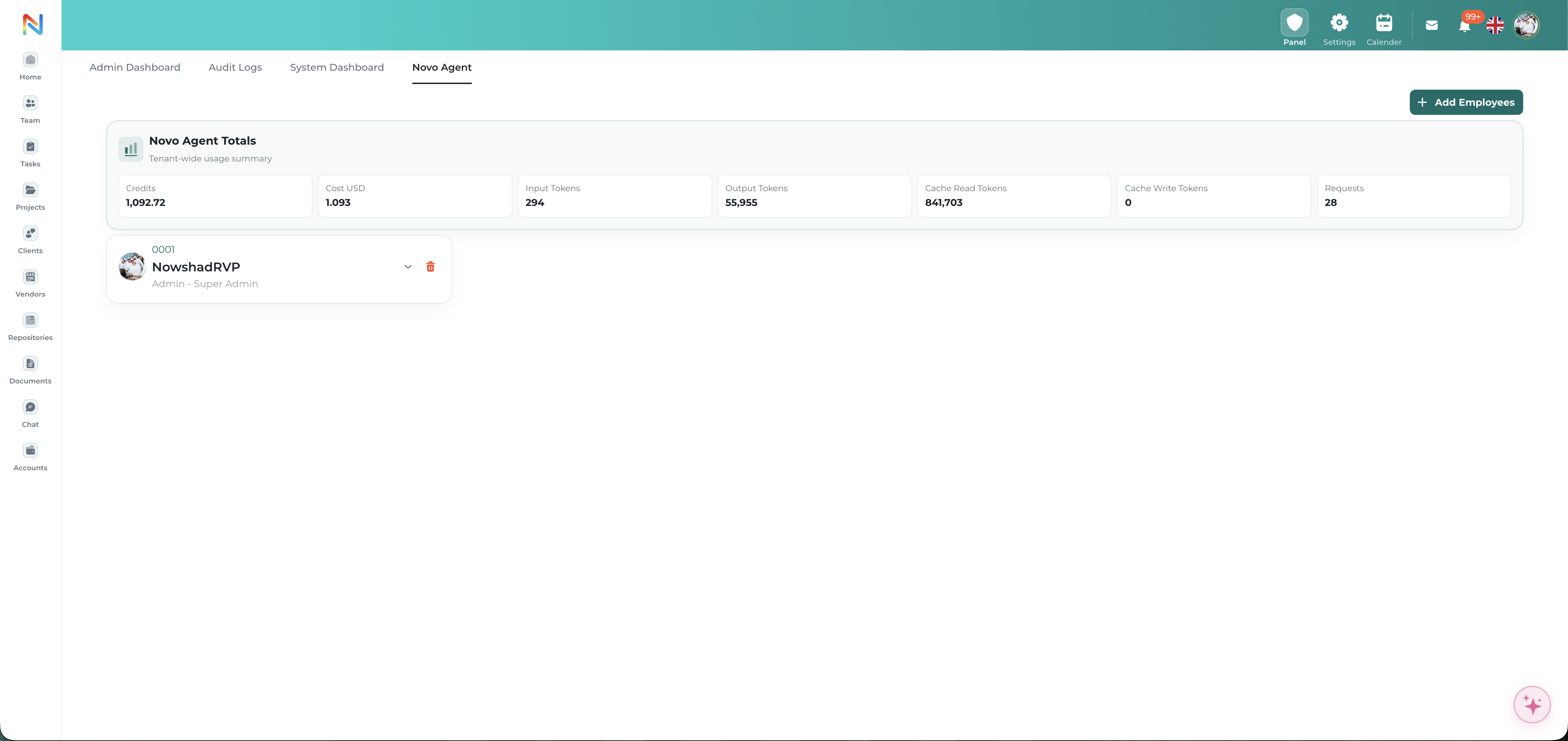
From the Admin Dashboard, administrators can grant or revoke AI Agent access for individual employees and monitor usage across the organization — including credits, cost, and token consumption — keeping adoption secure and fully visible.

Add or Remove Access

Grant or revoke an employee's access to the AI Agent anytime

Per-Employee Role Visibility

See each employee and their role, like Admin or Super Admin

Admin-Controlled

Only administrators can manage who has AI Agent access

Cost & Credit Tracking

Monitor credits and USD cost of AI Agent usage

Token & Request Monitoring

Track input, output, and cache tokens plus request volume

Tenant-Wide Summary

Total usage across every employee in one summary card
Admin-controlled Usage transparency Cost tracking
Access Controls
app.novologs.com/admin/novo-agent
NOVOLOGS AI Permission Controls

Web Administration

AI Agent governance is managed securely from the web platform.

Employees can chat with the AI Agent and receive permission-aware answers from mobile devices, while access configuration and governance controls remain managed through the secure web admin panel.

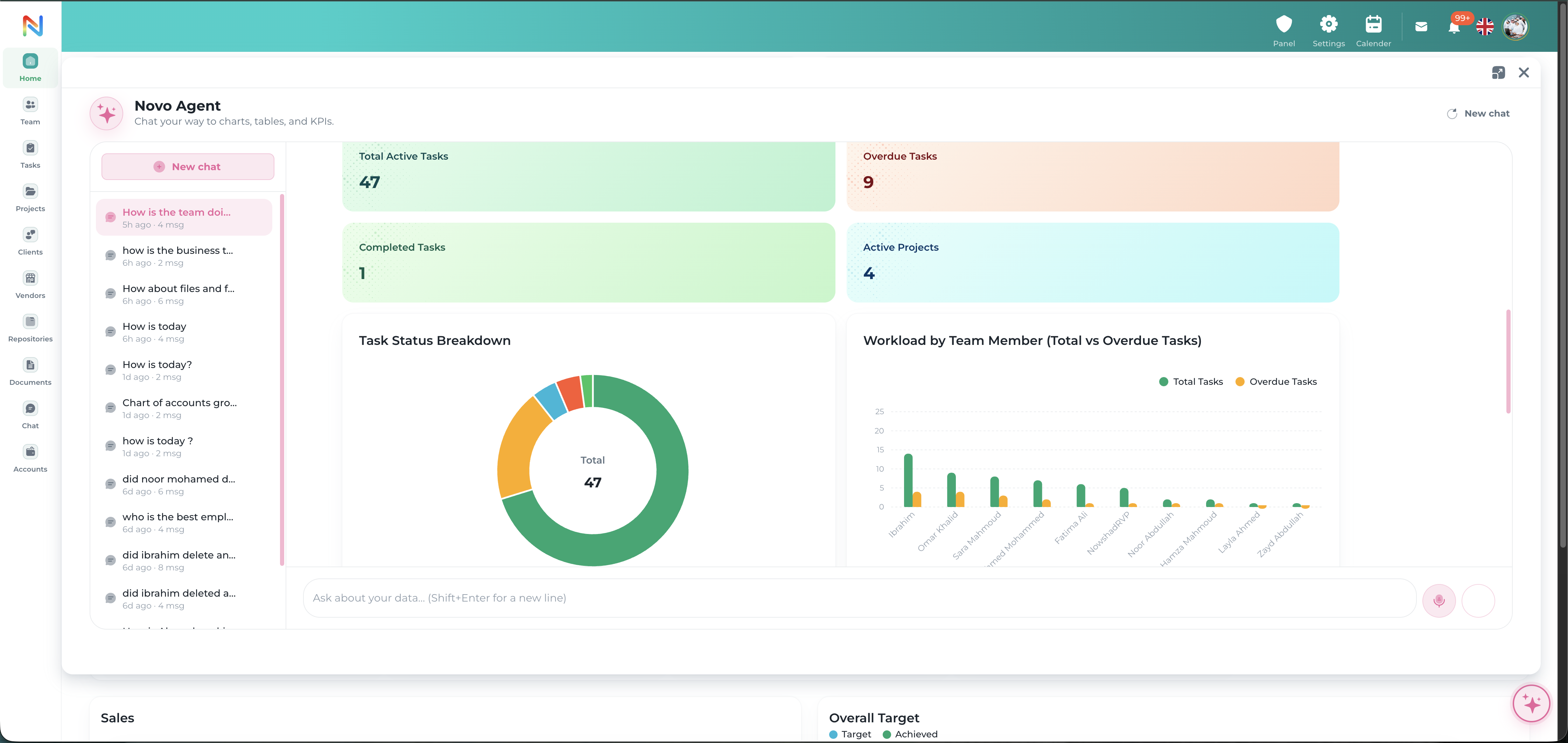
Automated Reports

Generate status reports and summaries in seconds.

Ask for a project status, task summary, or department update and the AI Agent compiles it instantly — pulling live data instead of static exports.

Project Status Reports

On-demand progress summaries

Task Summaries

Completed, pending, and overdue at a glance

Department Overviews

Workforce and workload summaries

Scheduled Digests

Daily or weekly summaries, automatically

Export-ready Output

Share summaries with your team instantly

Custom Report Requests

Ask for exactly the breakdown you need
Live reports Auto-generated On-demand
Live Reports
app.novologs.com/ai-agent/reports
NOVOLOGS AI Generated Reports
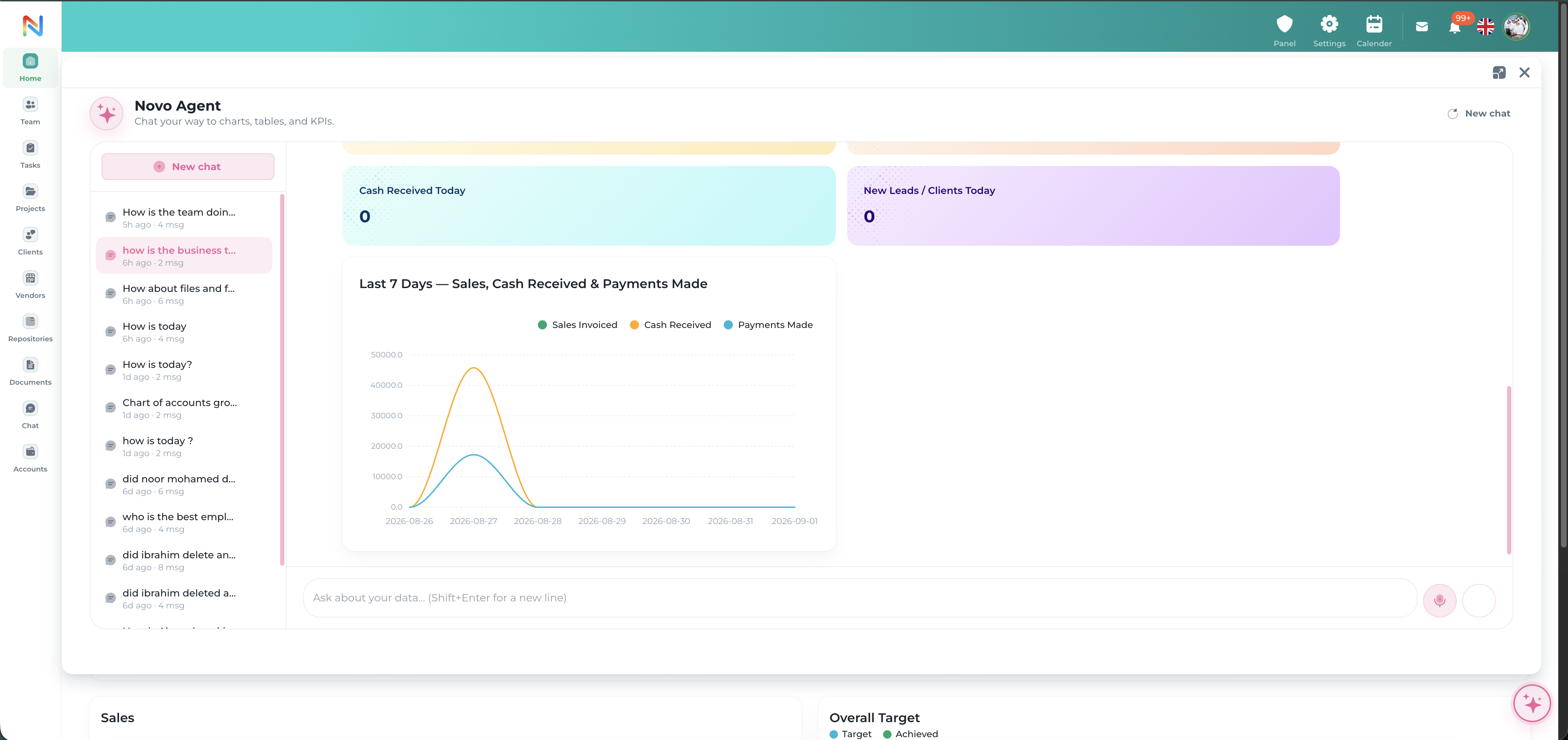
Analytics & Graphs

Turns your data into charts and graphs automatically.

Ask for a trend, breakdown, or comparison and the AI Agent generates bar charts, donut charts, and dashboards on the fly — no manual chart building.

Bar & Trend Charts

Visualize progress and trends over time

Donut & Distribution Charts

Break down workload by module

Custom Timeframes

Daily, weekly, monthly, or custom ranges

Comparative Analysis

Compare teams, projects, or periods

Dashboard Embedding

Generated visuals fit directly into dashboards

Shareable Insights

Send generated charts straight to your team
Auto-generated charts Visual insights Real-time data
Generated Analytics
app.novologs.com/ai-agent/analytics
NOVOLOGS AI Generated Analytics
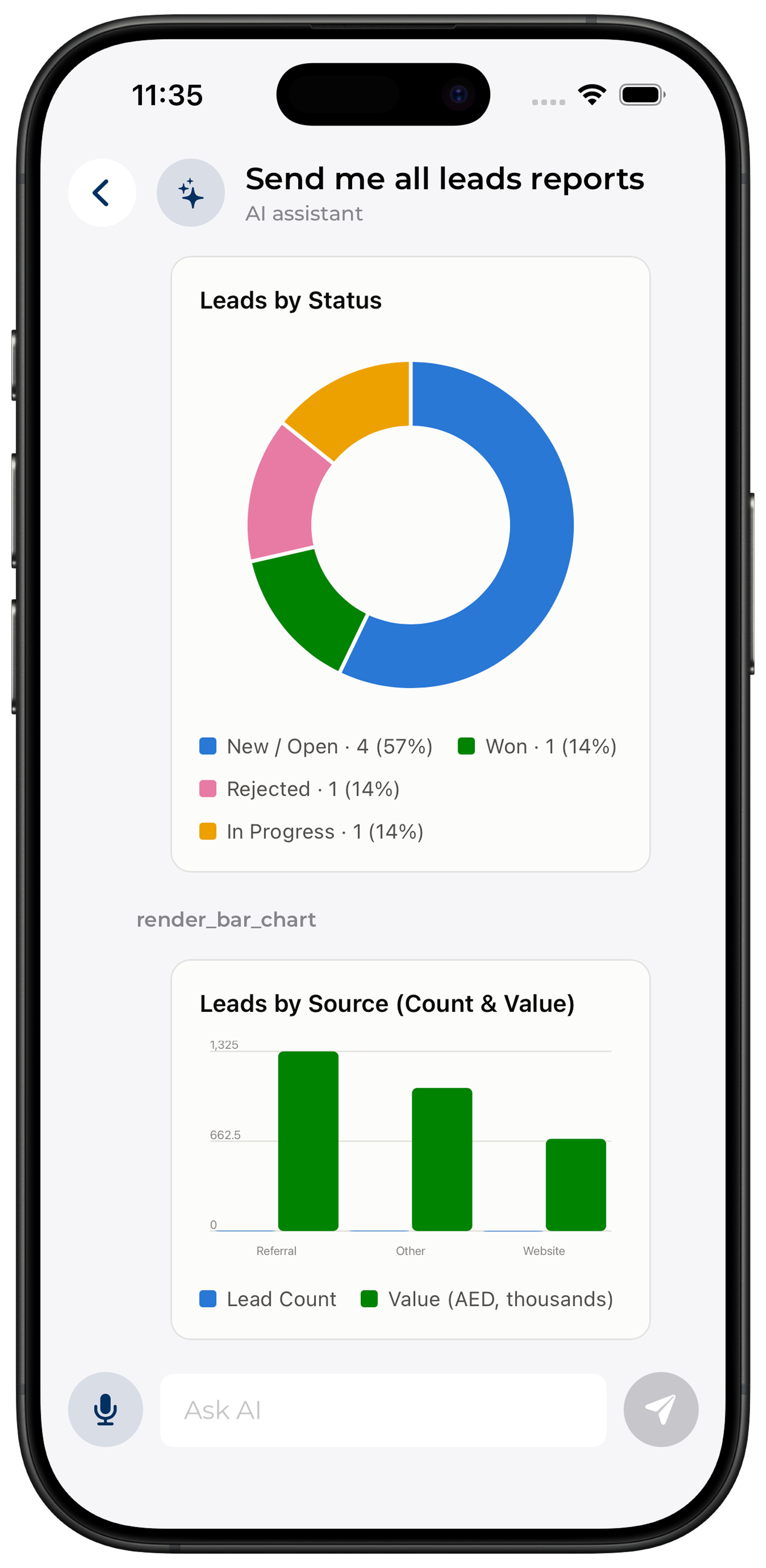
NOVOLOGS Mobile Analytics
Mobile Analytics

Visual insights, generated on the spot.

Ask for a chart or breakdown and view the generated graph instantly from mobile devices.

Generated charts

Ask for a graph, get it instantly.

Distribution views

See workload breakdowns by module.

Live sync

Charts stay updated across web and mobile.

Get answers from your workspace in four simple steps

Connect your workspace, ask a question, and get permission-aware answers, reports, and graphs from one centralized AI Agent.

1
Step 01

Connect Your Workspace

The AI Agent links to tasks, projects, documents, and teams within your organization.

Workspace connection
2
Step 02

Ask a Question

Type or ask naturally about status, data, tasks, or reports — in your own words.

Natural language query
3
Step 03

Get Permission-Aware Answers

Responses respect your roles, department restrictions, and admin-configured access rules.

Secure by design
4
Step 04

Receive Reports & Graphs

Get instant summaries, auto-generated charts, and dashboards built from live data.

Live generated insights
AI-Powered Intelligence

Ask smarter.
Work faster with AI.

Get instant, permission-aware answers, auto-generated reports, and visual insights — all from one connected AI Agent. Over time, as more of your organization's data lives in Novologs, it becomes an increasingly valuable digital business assistant.

Chat & Instant Answers Auto-Generated Reports & Graphs Permission-Aware by Design